Tax Deductions Calculations
How Moorr Helps You Estimate Your Tax Bill (For Free!)
Getting your tax right is a big deal. Overestimate your deductions, and you could be hit with a surprise tax bill (and even interest charges). That’s why accuracy matters — and why we built Moorr to help you stay on top of it.
Moorr gives you a real-time estimate of your annual tax, based on your income, property deductions, and allowable expenses. What you see on your Moorr Dashboard (see a sample test screenshot below) isn’t a random guess — it’s actually similar to the numbers calculated by the ATO. In fact, you can even cross-check it with tools like PayCalculator and see it lines up.
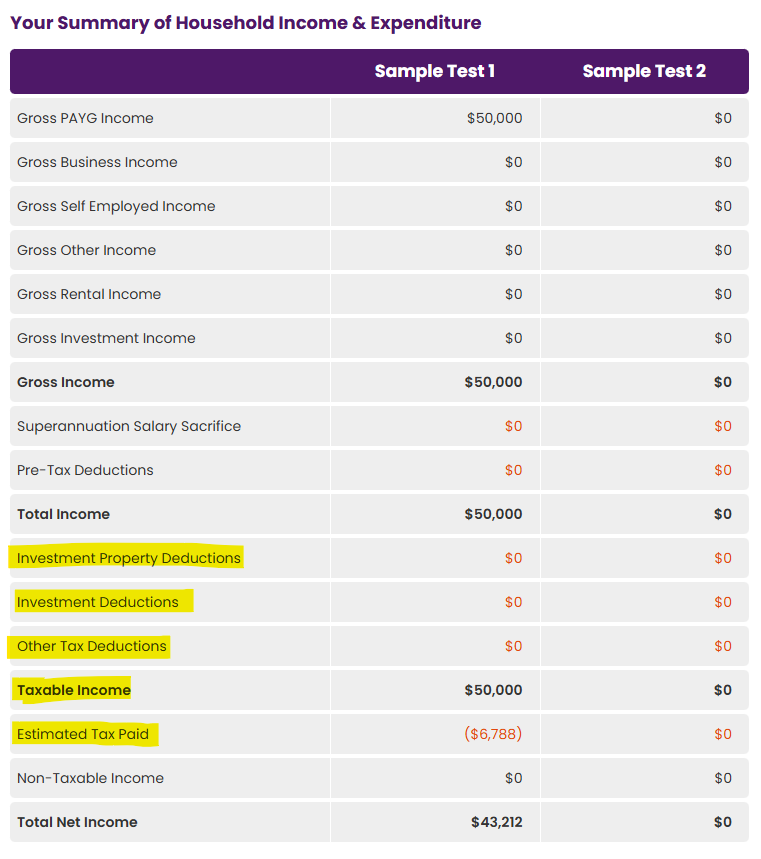
Here’s how it works:
- Your taxable income (after deductions) is used to calculate your estimated tax payable.
- That tax is then subtracted from your gross income, giving you a clear net income figure.
- The difference you see between this net income and what hits your bank account each pay cycle? That’s often the tax refund (or tax payable) that balances out at year-end.
Moorr also separates your tax deductions into two clear views:
- As a cash expense — to show the real impact on your budget.
- As a tax benefit — to reflect how they reduce your taxable income and help you pay less tax overall.
So instead of guessing or manually adding tax returns later, Moorr helps you plan with clarity and accuracy all year round. And when tax time rolls around? You’ll be better prepared — no surprises, just smart estimates.
Additional Feature: Property Tax Depreciation Schedule in Moorr
Moorr also lets you add depreciation data for each financial year for any investment property — whether it’s a single total amount or split into Capital Works and Plant & Equipment.
Depreciation is a non-cash deduction that lowers your taxable income and boosts your cash flow without needing to spend a cent more. You’ll find depreciation entry fields under any Investment Property set as “Investment” or “Business Use” — available on both web and mobile.
This data feeds directly into Moorr’s Investment Property Deductions calculation, which impacts your net income and is used across your dashboards (MoneySMARTS, MoneyFIT, MoneySTRETCH, and more).
💡 Tip: If you don’t yet have a depreciation schedule, it may be worth getting one — even for older properties. You could back-claim previously missed deductions.
Additional Feature: Property Cashflow Projection Tool
Want to see exactly how your property is performing — before and after tax? Moorr’s Property Cashflow Projection Tool shows you a full breakdown of each investment property’s projected performance.
You’ll see:
- Income vs. outgoings (including loan repayments)
- Loss before tax
- Estimated tax saved or payable
- Final cashflow shortfall after tax
You can even isolate the taxable position of each property — factoring in depreciation (if entered), loan interest, and expenses — to understand your true tax impact and profitability.
To access it:
- Head to any Investment Property in Moorr and click the new “Cash Flow” tab.
- Make sure your loans are correctly linked to the property, and your offset accounts are attached to see full benefit projections.
This tool gives you the clarity you need to:
✔ Make informed decisions
✔ See if a property is working for or against your goals
✔ Understand how tax plays a role in your returns
Whether you’re in growth mode or planning your next step, this tool helps you forecast smarter and invest more confidently.