One of the first steps towards achieving a financial goal is turning it into a clear plan.
Dynamic MyGOALS allows you to create personalised goals, set target dates and target amounts, and see how each goal interacts with your broader financial picture.
Whether you’re planning a holiday, saving for a major purchase, or working towards a longer-term financial objective, creating goals helps you better understand what’s achievable based on your current financial position and future cash flow.
What You’ll Learn
- How to create a new goal
- Understanding goal categories
- Setting target dates and amounts
- Managing and updating existing goals
- How Dynamic MyGOALS updates projections automatically
Why This Feature Matters
Goals rarely stay the same forever.
As priorities change, being able to adjust amounts, dates and targets helps ensure your financial plan remains aligned with your circumstances. Dynamic MyGOALS provides the flexibility to adapt while maintaining visibility over your broader financial pathway.
Quick Guide: Creating Your First Goal
Step 1: Select Add Goal
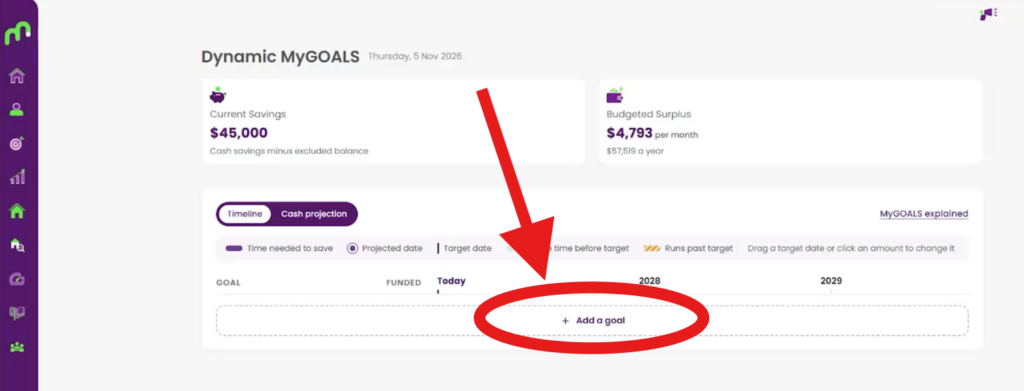
After navigating to Dynamic MyGOALS (Left sidebar > MyLIFESTYLE> Dynamic MyGOALS), scroll to the bottom of the page and click “Add a goal”.
Step 2: Choose A Goal Type
Select a category that best matches your financial objective
Step 3: Enter Goal Details
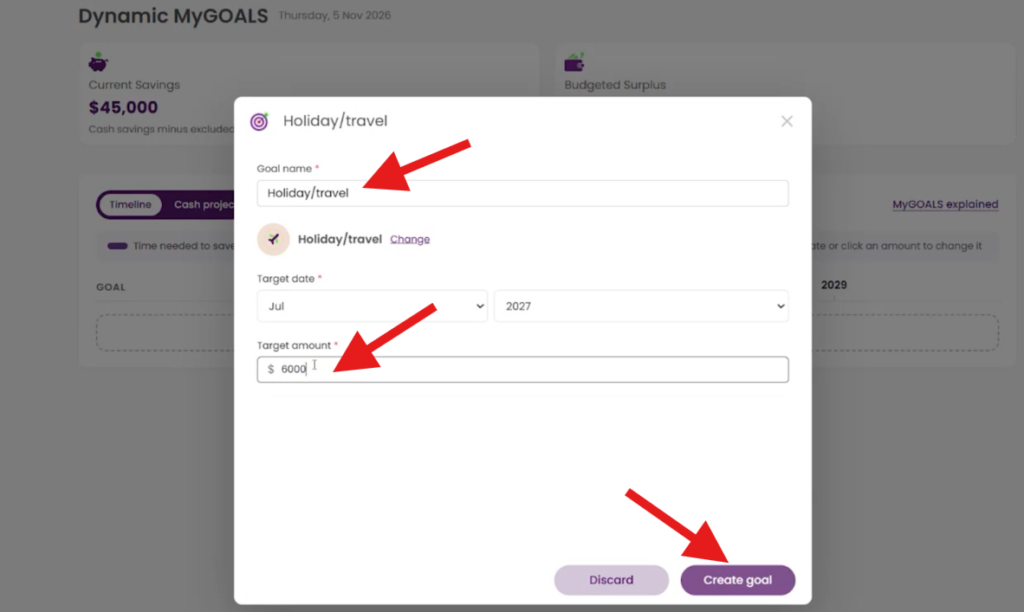
Enter a goal name, target date and target amount, and “Create Goal” to finalise.
Step 5: Update Goals Anytime
Click a goal to edit its details, amount or target date as needed.