The Timeline View provides a visual overview of all your goals in one place.
It helps you quickly identify which goals are on track, delayed or may require future adjustments, while providing visibility over progress and projected achievement dates.
This makes it easier to stay informed and make proactive decisions.
What You’ll Learn
- Understanding target dates
- Projected completion dates
- Goal progress indicators
- Delayed and at-risk goals
- Monthly allocation tracking
Why This Feature Matters
Being able to visualise progress can make goal tracking more engaging and actionable.
The Timeline View helps transform complex financial planning into an easily understood roadmap.
Quick Guide: Reading the Timeline
Step 1: Review Goal Timeline
Navigate to the timeline where you can view your goals.
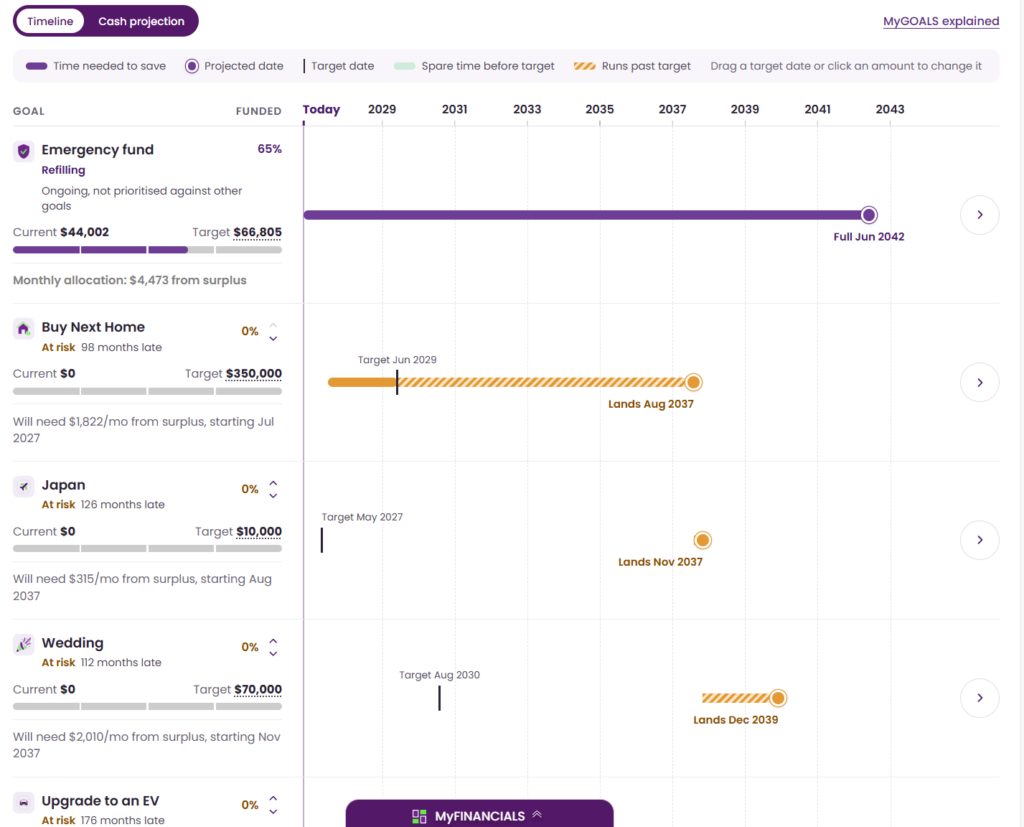
You will notice there is a ‘Key’ at the top where the various symbols and colours used in the timeline are defined.
Step 2: Check Targets & Projected Dates
Choose a goal, and note its Target date, and its Projected date. You will notice that Target dates can be moved and interacted with on the timeline, but projected dates must be adjusted at a Goal level.
Step 3: Monitor Progress & Identify Delays
As goals change so too should their target dates. Purple means on track, Yellow is at risk though still achievable and may need another look, and Red indicates a goal is not achievable in your current scenario and will need to be reviewed.