Owning property comes with paperwork. Contracts, insurance certificates, rates notices, valuations, lease agreements, the list only grows the longer you hold. Having one place for your financial document storage can make a huge difference, especially when tax time rolls around, you’re refinancing, selling, or your accountant needs something quickly. And when tax time rolls around, or you’re refinancing, selling, or just trying to answer a quick question from your accountant, that paperwork is usually scattered across email threads, phone photos, and half-remembered folders on your laptop.
We built Document Upload to make financial document storage in Moorr simpler. Every Asset, Expense, Income, and Loan card in MyFinancials now has its own document library, right where you already manage that item.
Financial document storage, right where it belongs
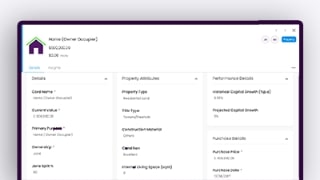
Log in to Moorr on your computer, head to MyFINANCIALS, and open any card. Alongside Details, Insights, you’ll now find a Documents tab.
The Documents tab gives each MyFINANCIALS card its own dedicated space for financial document storage. Upload a file and keep it against the specific asset, loan, income or expense it relates to — rather than digging through unrelated folders when you need it later.
Here’s a step by step guide:
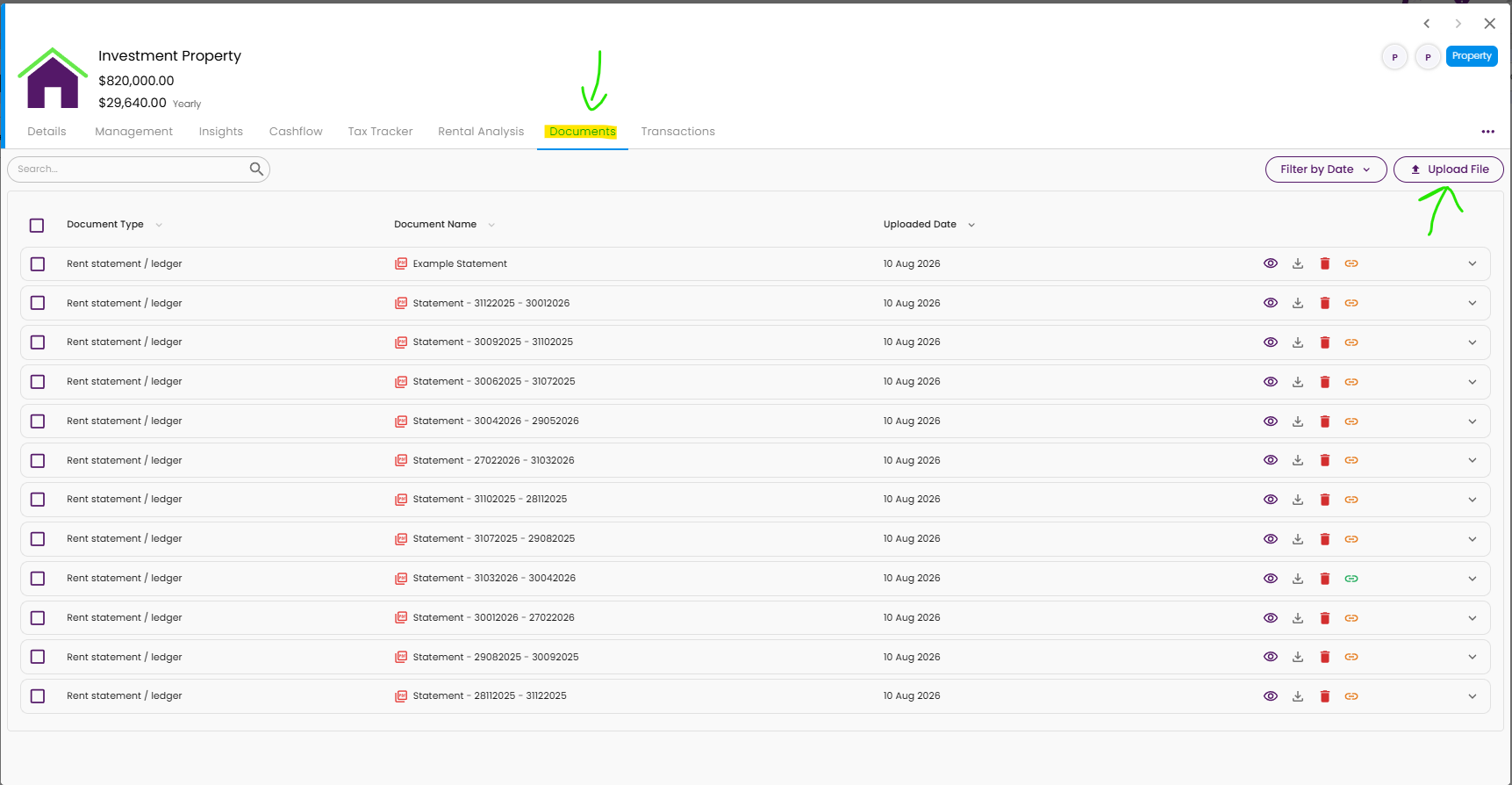
Step 1: Find the relevant card in MyFINANCIALS. In the example below, we’re using an Investment Property card. Open the Documents tab, then select Upload File.
Step 2: A pop-up will appear. Simply drag your files across or browse to upload them. You can upload multiple files at once, and you’ll see the upload progress at the bottom of the page. Once it’s uploaded, you can also select a document type to make your files easier to find and keep everything organised.
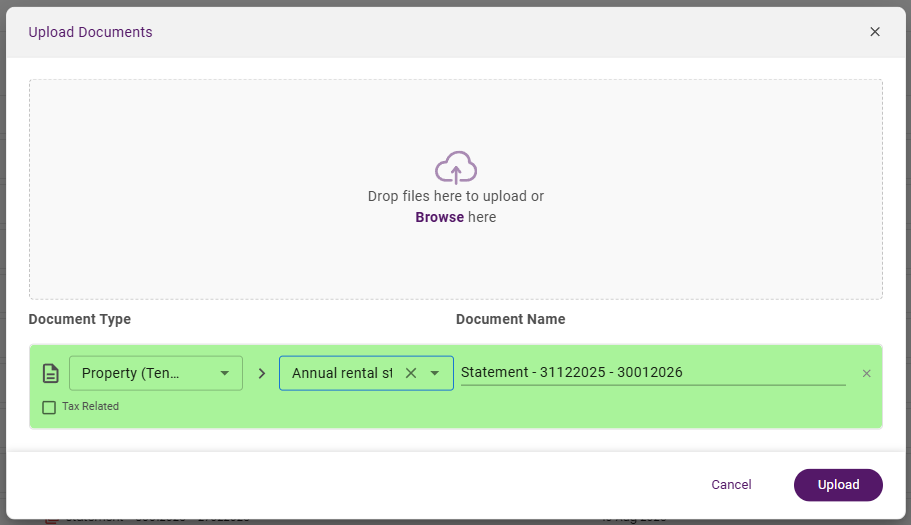
Step 3: And that’s it! Close the pop up and you’ll see them in the “Documents” tab in the respective Card. On the right of the documents, you’ll see a few icons.
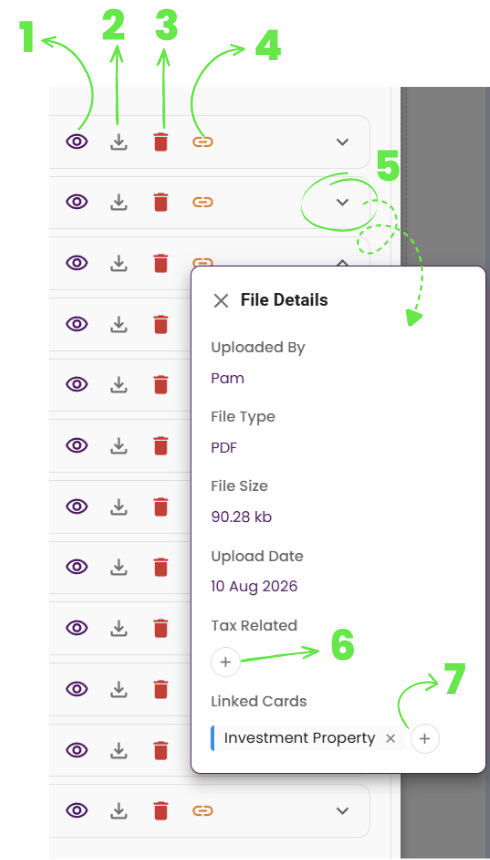
Here’s what each option does:
- Click to Preview the document in your browser
- Download the document to your device
- Delete the document
- Link it to a transaction that you have added in Moorr. Click here to learn more about Transactions >
- Will open up a pop up for more details on the document.
- You can select which Financial Year this document relates to. That way, it’ll be included when you generate your Property Tax Reports in Moorr >
- You can also link it to other cards in your MyFinancials
What does it do?
The Documents tab gives each MyFINANCIALS card its own dedicated filing system. Drop a file in (drag-and-drop or browse to upload), and it’s stored against that specific card — no more digging through unrelated files to find the one you need.
Every document is tagged with a Document Type, a Document Name, and an Uploaded Date, so you can search or filter the list in seconds rather than scrolling through months of uploads. Whether it’s a single title deed or years of rates notices, it’s all in one place, attached to the property it belongs to.
And this is just the start. As we continue building Opti’s document capabilities, the goal is for Moorr to do more with the files you upload — extracting useful information (key dates reminder etc), helping populate relevant details in Moorr and reducing more of the manual admin over time.
For investment properties, we’re already starting to bring this to life through Rental Statement uploads, where Opti can extract individual income and expense transactions for you to review and confirm. You can learn more about this here >
Why this matters
Let’s be honest, most people aren’t filing paperwork the moment it lands in their inbox. It gets saved “somewhere” and found again under pressure, usually right when it’s needed most: at tax time, mid-refinance, or when your accountant asks for a document you haven’t looked at in months.
Centralising documents against each card removes that scramble. And when your accountant, mortgage broker or another professional asks for something, you know exactly where to find it instead of starting another round of “let me find that and send it through”.
A quick example
Say your Quantity Surveyor sends through a depreciation schedule for an investment property. Instead of it living in your downloads folder, you open that property asset in MyFINANCIALS, go to Documents, and upload it straight away, tagged as a Depreciation Schedule.
Or your bank sends through a new loan statement after a refinance. Open that loan card, drop the statement into Documents, and it’s tagged, dated, and ready whenever you need to reference it, without a search across your entire inbox.
And when tax time comes around, those documents can also support your Property Tax Report in Moorr, helping bring your property income, expenses, loan interest, ownership details and supporting records together in one place.
Built to help you stay organised
Document Upload isn’t trying to replace your accountant’s records or become a legal document vault, it’s there to give you a clear, card-by-card home for the paperwork that matters, so staying organised takes minutes, not hours. It’s another piece of trapping the admin overhead that gets in the way of focusing on your Lifestyle by Design.
It also works alongside features like Investment Property Transactions and the Property Tax Report, helping turn the documents you store throughout the year into more useful financial and tax-time information.