Every financial year, property investors face the same job: pulling together rental income, expenses, loan interest, ownership details, lease dates and supporting documents for their accountant.
The hard part usually isn’t the maths. It’s finding everything, remembering what’s missing and checking that it’s all in the right place.
That’s why we’ve introduced a Property Tax Report that you can generate in Moorr. It’s a tool to help you organise the information behind your investment property deductions and walk you through the process step by step, with Opti helping you review things as you go.
See it in action
Alric and Connor from the Moorr Product Team recently demonstrated Generate Tax Report during our YouTube LIVE.
You can also download a Sample Property Tax Report Here >
Where to find it
Log in to Moorr on your computer, open an investment property in Tax Tracker, and select Generate Tax Report to launch the guided wizard.
What does it do?
The Property Tax Report takes you through eight steps, pulling in data you’ve already got in Moorr rather than asking you to re-enter it.
- FY Select. Choose the financial year you’re reporting on.
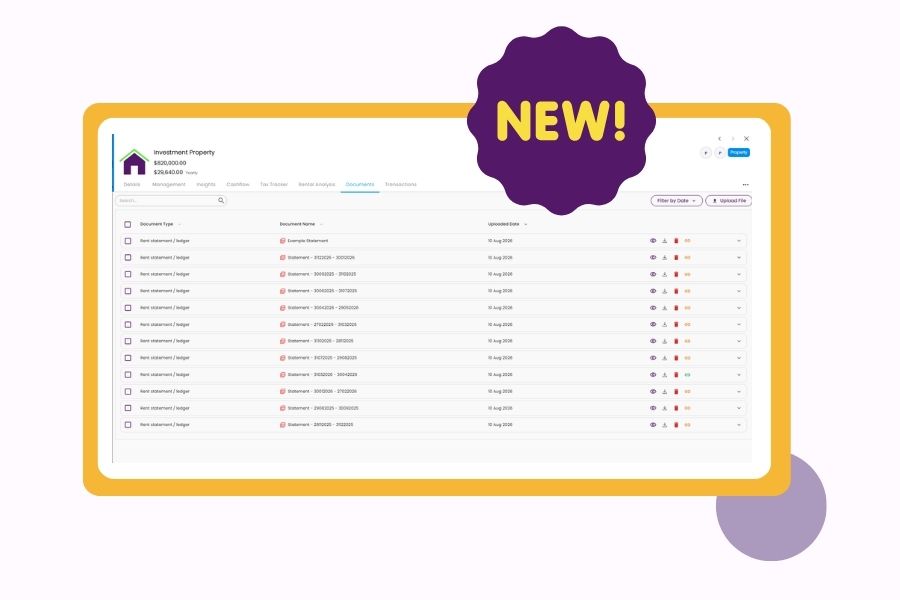
- Documents. Upload your rental statements for the year using our Document Upload feature. Opti reviews them and extracts any transactions that haven’t been captured yet, tagging them as tax-related for that financial year.
- Generate. Get a quick preview of your numbers, including gross rent, interest deductions, capital works deductions, other rental deductions and net rent, plus an ownership split preview. From here, you can generate the report immediately or keep reviewing.
- Income. Review the year’s income transactions, including transactions already captured through Transaction Feeds. Opti can prompt you when something may be miscategorised — for example, flagging items such as insurance payouts for lost rent, retained bonds or tenant reimbursements that may belong under Other Rental Related Income rather than Rent Income. You can then move transactions between sections as needed.
- Expenses. Review the year’s expense transactions. If Opti notices you haven’t logged anything against common categories such as council rates, water and sewerage, management fees, property insurance, maintenance or advertising, it can flag this for you to review or add the missing transaction. This can help you spot potential gaps in the information supporting your investment property deductions before the report reaches your accountant.
- Loans. Confirm the deductible interest on each investment loan for the year.
- Ownership. Confirm the ownership split and purchase date, then review lease information. Moorr calculates the days available for rent against the total days in the financial year and suggests an apportionment percentage based on your lease dates and rental listing data, with the option to override the day count if needed.
- Final Report. Review a full summary of total income, total expenses, total loan interest and net rent, alongside the ownership split, apportionment and linked documents.
Generate the report and it’s saved as a PDF to MyDocs and downloaded automatically. You can also generate more than one report for the same financial year, with each version timestamped separately.
Why this matters
Most of what makes tax time stressful isn’t the maths. It’s the risk of missing something.
An expense category you forgot about. A transaction sitting in the wrong section. Loan interest that may not all be deductible because of a redraw. Or a lease that didn’t run for the full financial year.
The Property Tax Report helps surface those gaps as you go, instead of leaving you to notice them after the fact — or waiting for your accountant to find them for you.
And because everything lands in one PDF, saved automatically to MyDocs, you’ve got a clean, dated record each year rather than a folder full of spreadsheets and half-remembered numbers.
By the way, you can make tax time insightful by using Investment Property Transactions throughout the year. Upload your monthly rental statements and Opti can extract the gross rent, management fees and other expenses for you to review, giving Moorr a more complete picture than the net amount that lands in your bank account. That information can then flow through when you prepare your Property Tax Report.
Built to help you get to tax time with confidence
The Property Tax Report doesn’t replace your accountant, and any suggested apportionment or interest deductibility calculations are based on the information available in Moorr, not your final tax position.
What it does is help make sure the information you bring to your accountant is more complete, organised and easier to review — so preparing your investment property deductions feels more like running through a checklist than starting from scratch.
Important note
The Property Tax Report is a tax preparation tool.
Apportionment percentages and loan interest deductibility are suggested calculations based on the information available to Moorr and should be reviewed with your accountant before you rely on them, particularly where a loan has been redrawn for personal use or a lease didn’t run for the full financial year.
It does not constitute tax advice.
Ready to get your property tax information organised?
Create your free Moorr account, add your investment property and start bringing your income, expenses, loans and documents together in one place.
Create your free Moorr account →