When we first launched MyGoals back in 2022, we wanted to give your big dreams a home in Moorr. Somewhere to set your goals, add target dates, personalise them and track your progress.
But knowing what you’re working towards is one thing. Knowing whether your money can actually get you there? That’s a whole different story.
A wedding, a holiday, buying a home or upgrading your car. They’re all exciting goals, but they’re also competing for the same pool of savings. Throw in car rego, quarterly council rates and an unexpected vet bill, and figuring out whether you’re on track gets even trickier.
That’s why we’ve taken MyGoals to the next level.
Introducing Dynamic MyGoals: Goals that keep up with your life.
By connecting your goals to your actual savings, budgeted surplus and priorities, Dynamic MyGoals projects your path forward, one month at a time.
Change a goal, a date or your budget, and your projections update instantly.
Same big dreams. A whole new way to work towards them.
What is Dynamic MyGoals?
It’s Goals, rebuilt around your actual money. A goal is no longer just a target and a countdown. Each goal now gets a live projection of when it will be fully funded, based on:
- The savings in your bank accounts today
- Your budgeted Surplus: your income, less your expenses and loan repayments
- The order you’ve ranked your goals in
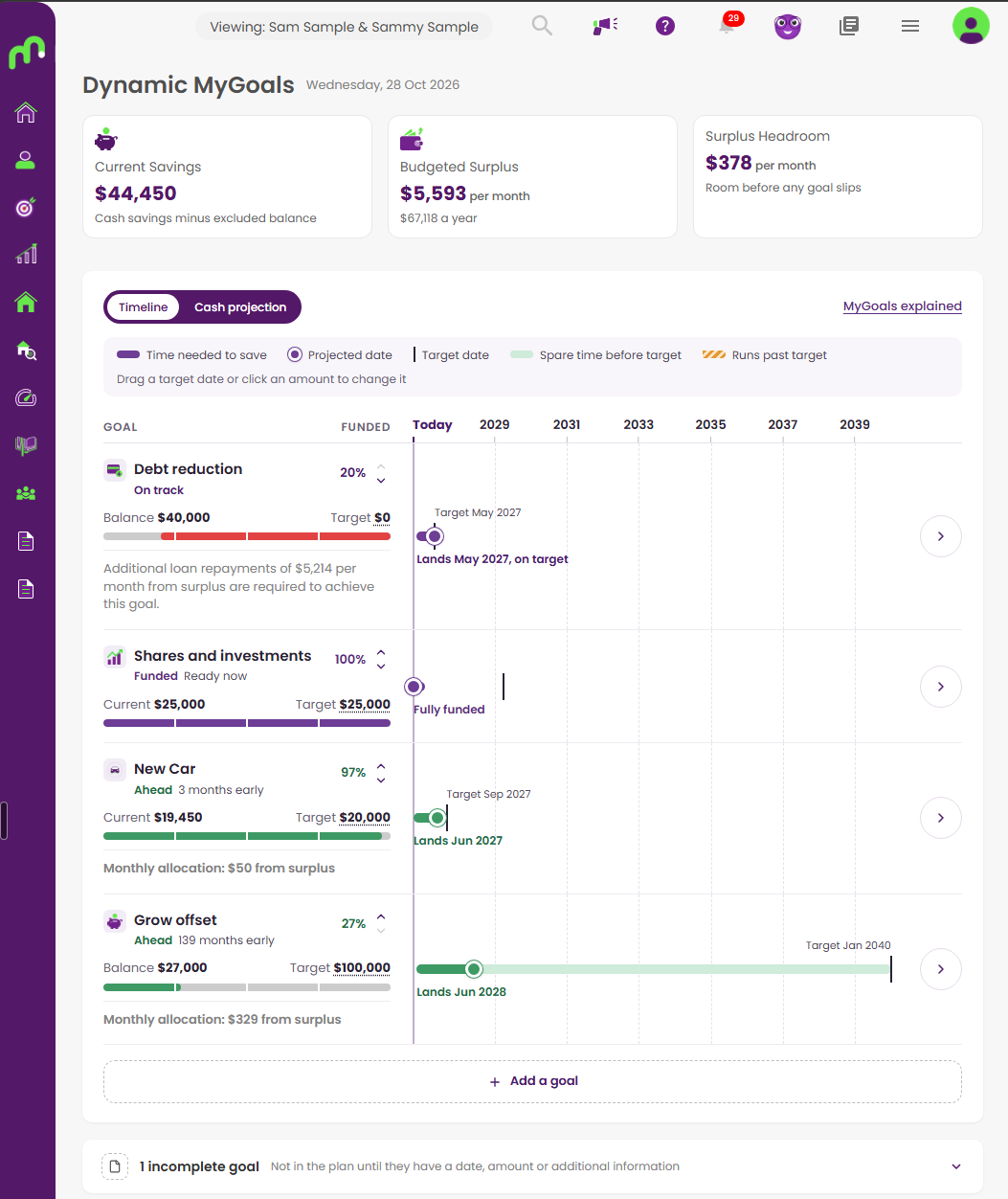
The result is a plan that tells you which goals are on track, which are ahead and which need attention. It also shows how your cash moves over the years ahead.
How does it work?
Each time you open MyGoals, it works through four steps.
- It starts with what you’ve already got. The money in your bank accounts goes to your emergency fund first. What’s left goes to your goals, starting with your top priority. You can set aside a balance you don’t want counted, like money you keep in an offset account.
- It adds your surplus each month. That’s your budgeted income less your expenses and loan repayments. Bills land in the months you actually pay them, based on last year’s transactions or the bill’s next due date. So a quarterly bill shows up in the month it’s due, not spread thinly across the year.
- It shares that surplus out in your priority order. Your emergency fund is topped up first. Then each goal gets what it needs that month to reach its target date, starting with your number one. If a goal starts falling behind, it gets help first. Anything left over brings your goals forward.
- It re-runs whenever something changes. Add a goal, move a date, reorder your list or update your budget, and the plan updates on the spot.
Your priorities, your call
Not every goal matters equally. A house deposit might come before a European holiday, and the emergency fund comes before both. Drag your goals into the order that suits you. MyGoals funds them in that order and shows you what changes.
What will I see?
Where each goal stands
Every goal gets a status, so you can tell at a glance where you’re at.
| Status | What it means |
|---|---|
| Ahead | On course to be fully funded before its target date |
| On track | On course to be fully funded by its target date |
| At risk | Will get there, but after its target date |
| Not achievable | Won’t be fully funded on your current numbers |
| Funded | Already has everything it needs |
| Paused | Set aside for now and receives nothing until you resume it |
Click a goal to see how much it has, how much it needs each month and what it’s receiving right now.
Your cash, month by month
The cash projection shows how your money builds over time: how much is set aside for each goal, and how much is unallocated. You can see each goal grow, and the month it’s spent. When your wedding fund pays for the big day, you’ll see a $25,000 drop that month, exactly as planned. View 1, 3, 5 or 10 years ahead, and tap any month to see the breakdown.
Your wiggle room
The summary tiles show your current savings, your monthly surplus, and how much breathing room your plan has:
- When everything’s on track: your Surplus Headroom shows how much your monthly surplus could drop while every goal still lands on time.
- When something’s behind: you’ll see the Additional Surplus Required to get every goal back on track.
A few things to know
We’ve kept the projection simple, so you always know where a number comes from.
- Amounts are in today’s dollars. The plan doesn’t add inflation, interest on your savings or investment growth.
- It assumes your budget stays as it is. If your income or expenses change, update your budget and the plan follows.
- Your plan is only as good as your data. Keep your bank accounts connected, your transactions categorised and your budget current, and your projection stays accurate.
How do I get started?
- Head to MyGoals in the Moorr web app.
- Add your goals, each with a target amount and a target date.
- Drag them into your priority order.
- Check your statuses and cash projection, and adjust until the plan feels right.
That’s it. From here, your goals keep up with you.